
I'm close to calling the whole wave of loops and graphs bullshit. But I can't quite do it. And that's the interesting part.
Because some of it genuinely works. I've built outer loops, inner loops and software factories both with and without humans in the loop, and some of them run really well. At the same time, I can find holes in almost everything posted about the subject.
It's hard to make sense of it on LinkedIn, X and Reddit. You almost have to build something yourself and see where it breaks.
So I went back and measured my own loops.
The loop is the easy part
A loop is easy to describe: Try, measure, fix and repeat.
The difficult word is measure.
In software testing, an oracle is something that can determine whether a result is right or wrong. A test can be such an oracle. It doesn't care who runs it, what prompt was used or how badly I want it to pass.
An agent loop can only continue without me if it has something like that to measure against.
I can see this directly in my own data. By a run, I mean the work performed between two human prompts.
In the snapshot I analysed, there were 1,233 runs in which the agent changed backend code. It invoked test commands 1,017 times. Across 576 runs in which it changed UI code, that happened 16 times.
Nobody decided that the difference should look like this. It simply reflects what the agent was able to verify.
I see the same pattern in our end-to-end tests: They take 110 screenshots, but none of the images are evaluated automatically. There is no visual comparison and no check for things such as contrast. The machine diligently takes pictures. It just never looks at them.
So I built a loop for design anyway
If you don't have a fixed criterion, you can try replacing it with a judge. That's what I did.
My /aesthetic-fanout generates several visual directions at once. An LLM judge then selects the most distinctive one. The design station in my assembly line described the process like this:
This station has four phases in strict order:
strategic brief → aesthetic lock → operational intake → scaffold.
Reordering produces a generic site.
Generic output was therefore something the process actively tried to avoid. Later in the pipeline, I also added checks for accessibility, desktop, mobile and the browser console.
Seven landing pages came out. Every station reported green.
Exhibit A: The report says success. The image doesn't.
agent-inbox-v5 was given a Plan 9-inspired style with windows, panes and tabs. It was carefully built, but the most important area of the page was almost empty: the text “type an agent address. press enter.” followed by roughly 400 pixels of nothing.
Even so, the delivery artifact's own caption said:
Full-page screenshot at 1440×900, signature move triggered
(transcript + JSON envelope visible in hero pane)
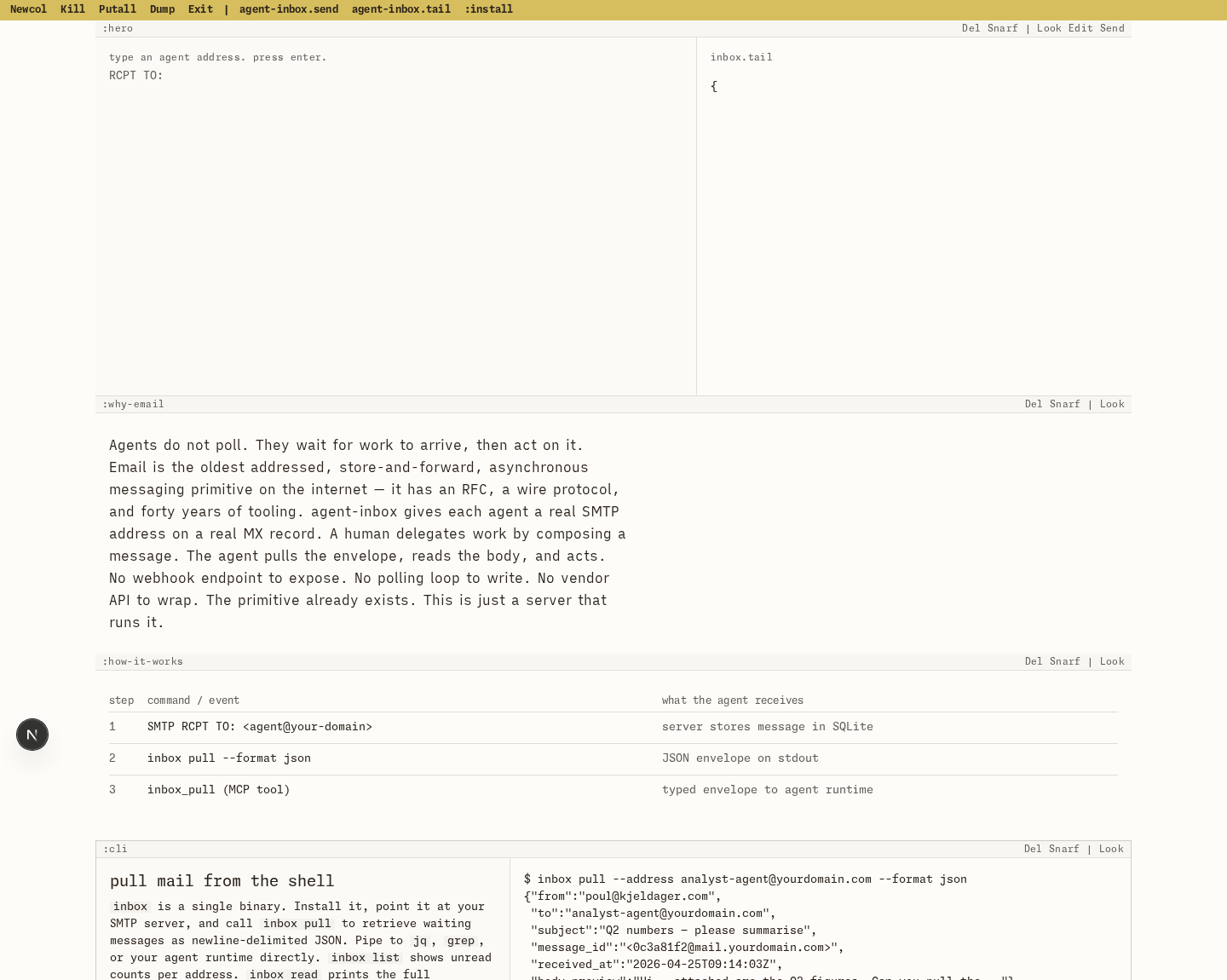
In other words, the agent wrote its own success report. The rest of the page rendered correctly, but the exact section where the chosen design move had to prove itself was empty. No gate compared the report with the image.
Exhibit B: Three placeholders in §7
idealab turned into a court file. It had a case number and “EYES ONLY” at the top, numbered sections and the text “IN RE: [REDACTED] / EXHIBIT A”. The primary button was labelled File a petition.
The §7 — TESTIMONIALS section consisted of three rows containing TESTIMONY PENDING. These weren't weak testimonials. They were placeholders, including one mangled string.
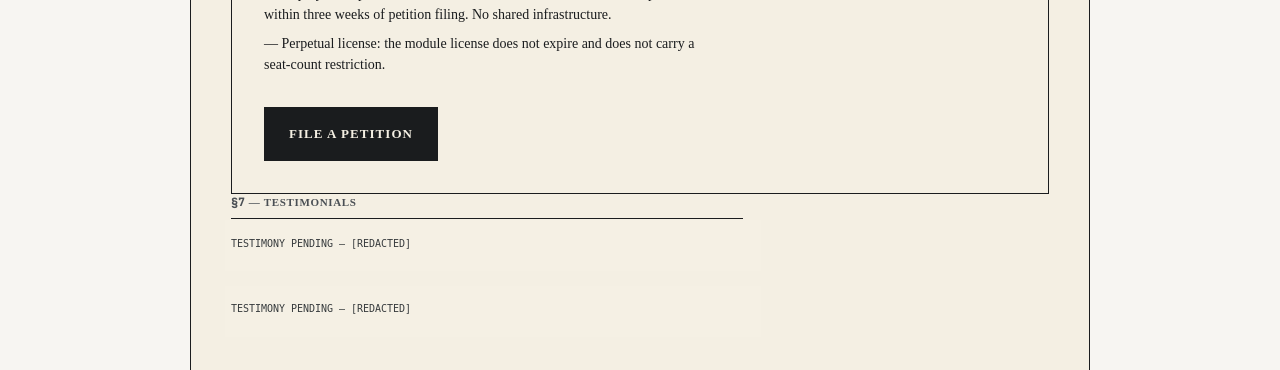
A human would stop at the first row. The loop continued past all three, through the accessibility, desktop and mobile critiques, and reported green.
The loop changed the costume, not the skeleton
The next part surprised me even more.
All seven pages had the same basic structure — including the two that went completely off the rails:
hero → what the product does → how it works in three steps → proof → price → FAQ → CTA
consent-service-v5 called the three steps I. ASKING / II. DECIDING / III. RECEIVING. agent-inbox-v5 displayed them in a :how-it-works pane. Even idealab, the most extreme proposal, still had testimonials and an FAQ. They were simply called §7 and §8.
The process was supposed to avoid generic results. It produced several candidates and had a judge choose between them. It varied typography, colours and wording, but the information architecture was the same as a template generator might have produced in 2010. When it finally changed the substance, the result became worse.
It wasn't a loop that created a new structure. It was a loop that changed clothes.
The first draft is only a sixth of the work
I also measured how much of the work happens in the first generation.
For 438 UI files whose creation I could observe, the initial write accounted for only 15.5 percent of all changes the files later received. The rest was iteration.
Many files were admittedly written once and never changed again. But the work concentrated in the important files: The five percent most frequently changed files accounted for half of all subsequent changes. The median was 20 separate human prompts per file.
ChatProvider.tsx, for example, was changed 127 times through 37 prompts over eight days.
That was 37 occasions on which I looked at the result and decided which direction to take.
This isn't only a UI phenomenon. For files containing program logic, the initial write accounted for 21.4 percent. Both begin as scaffolds. The difference is whether an oracle can later determine when the loop is finished.
A score doesn't solve the problem
I'm not saying that a model cannot evaluate taste. An LLM judge can absolutely help compare proposals and identify problems.
But an evaluation isn't necessarily stable enough to serve as the stopping condition in an autonomous loop. The same model gave the same file both 64 and 72 points. In another improvement loop, the score went from 64 to 64 and then down to 60.
A judge may be good enough to rank a pile of proposals. That doesn't mean it can determine when the page is finished.
A test says no. A judge says, “I prefer this one.”
This isn't an argument against loops
Loops can run for a long time on their own when they have a good oracle. That's why they often work so well for backend code, migrations and other tasks with tests, type checks or clear numerical targets.
UX is different. I've seen many convincing demonstrations of UX loops, but I haven't yet seen one that works reliably as an automatic quality gate. Mine doesn't either.
In my repo, four planned quality gates are still set to enabled: false. The agents that were supposed to critique the design could read code and search files, but they had no browser. They could read the page's code. They couldn't see the page.
The fix didn't come from the loop either. agent-inbox-v6 looks right again because a human saw v5, changed the prompt and started over.
Maybe the human isn't merely a temporary bottleneck waiting to be automated away. In creative work, perhaps the human is the oracle.
So my question is sincere:
How do you build a validation loop for good UX? What is the evaluation criterion?
My own criterion was “most distinctive”. The loop satisfied it. The result was a court file with placeholder text in §7.